Can’t keep up with Microsoft's updates across the Fabric platform? Don’t worry, McCoy has got you covered! In this quarterly blog, we’ll bring up the most important updates (from our perspective) grouped into key themes that reflect Fabric enablers. Finally, we’ll have a look at the most relevant upcoming features for the next quarter.
Upgrading the overall experience
During Q1 2026, Microsoft Fabric continued to focus on a more cohesive, enterprise‑ready data platform. This quarter was not dedicated on isolated features, but on strengthening the overall platform experience across topics like data management, engineering, governance, and intelligence.
A key theme was unification. OneLake as the central data foundation, making data assets easier to organize, discover, and govern. This supports a more consistent way of working.
Let's look back at 2026-Q1
Building a Unified & Discoverable Data Foundation (OneLake + Platform UX)
Fabric strengthens OneLake as both a metadata and access layer by enhancing catalog structure, standardizing item metadata, and introducing API-driven search and governance capabilities. These updates improve how data assets are organized, discovered, and managed, while also enabling broader integration with AI-driven workflows and external tools.
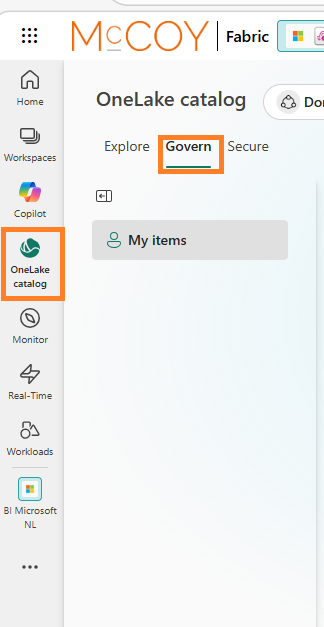
OneLake Catalog Govern for admins is now generally available, giving Fabric admins a central place to monitor, govern, and secure data across their Fabric environment. It helps admins get better visibility into the data estate and take action more easily from one location.
Tags:OneLake, Administration, Governance and Security
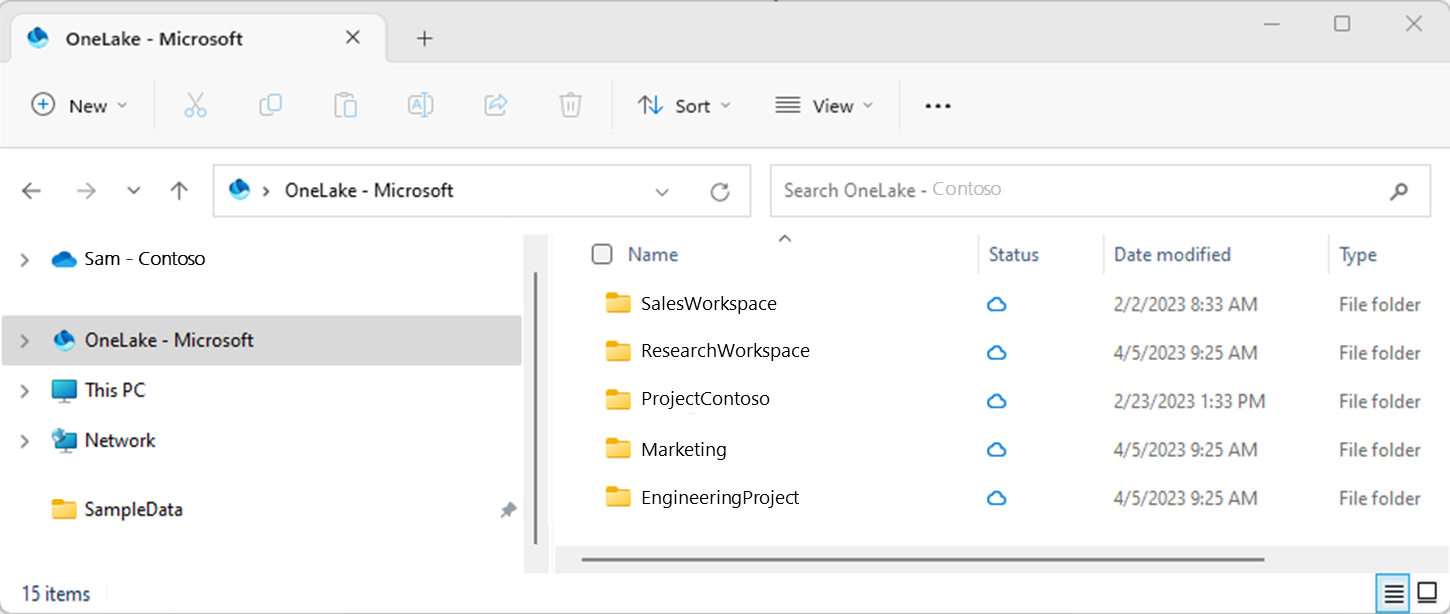
With OneLake file explorer you can Bring your local files to OneLake with OneLake file explorer without breaking your flow. This makes it easier to browse workspaces and data items, and to upload, download, or edit files using a familiar file system experience directly from Windows File Explorer.
Creating Reusable & Standardized Data Pipelines (Dataflows + Data Factory)
Fabric is evolving its data pipeline layer toward a configuration-driven and environment-independent architecture. Dataflows Gen2 improvements reduce reliance on static references and manual deployment steps, while enabling greater reuse and portability of transformation logic. In parallel, Data Factory enhancements expand incremental ingestion patterns and introduce performance optimizations that improve throughput and scalability. These changes position Fabric pipelines as more flexible, maintainable, and aligned with modern CI/CD and data engineering practices.
No more hassle referencing workspace items using fixed values for item IDs. Relative references let Dataflow Gen2 point to Fabric items by name instead of by workspace ID and item ID. The script stays valid as long as the item with the same name exists in the target workspace. Simply select items under (Current Workspace) and avoid hard-coded IDs. That makes CI/CD simpler and reduces the need to edit the query after deployment. This approach ensures that when you move your solution from development to testing or production, no script changes are required. Your Dataflow will continue to work based on item names, making deployments seamless without adding any extra components
Tags:Data Factory, Data Engineering, Fabric Ecosystem
This mechanism enables automatic publishing of your work when running or refreshing a dataflow with unpublished changes. This removes the need for a separate publish step and makes refreshes and CI/CD deployments simpler Note: the first run or refresh after changes may take a bit longer.
Tags:Data Factory, Data Engineering, Fabric Ecosystem
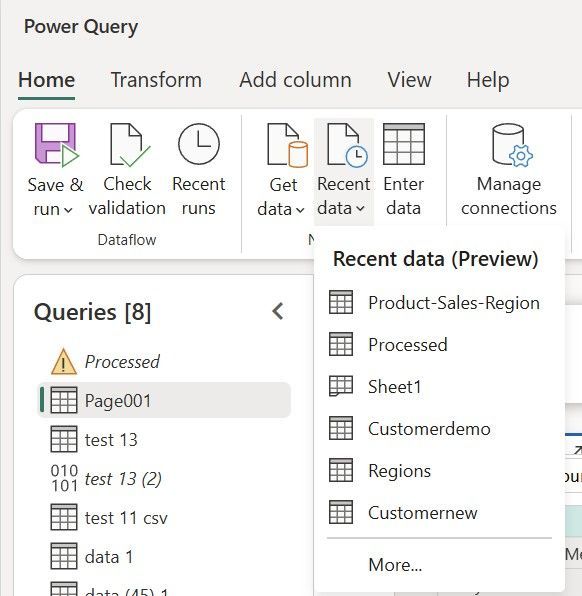
Recent data in Dataflow Gen2 helps users reconnect to recently used data sources more quickly. It reduces repeated navigation steps by quick access to frequently used files, tables, folders, and databases, potentially improving user productivity.
Copy jobs now support incremental copy for more connectors, including sources like Google Cloud, AWS Storage, Azure, on-premises, files and Fabric. Lakehouse tables. This gives teams more flexibility to move only new or changed data, improving efficiency in data movement.
Tags:Data Factory, Data Engineering, Fabric Ecosystem
You can now rename columns, adjust data types, or customize the destination schema while configuring in Copy Job patterns including full copy, watermark-based incremental copy, and CDC replication.
Enabling Scalable & Reliable Data Processing (Spark + SQL performance)
Fabric is evolving its execution layer to better support high-concurrency and large-scale data workloads across both Spark and SQL engines. Spark enhancements focus on reducing session startup overhead, increasing concurrency, and improving resource efficiency through shared execution and pre-configured compute environments. At the same time, runtime upgrades and storage optimizations enhance performance at scale. Complementing this, SQL engine improvements introduce more efficient query execution patterns and enhanced observability. These combined changes position Fabric as a more robust and performant platform for enterprise-grade data processing.
High Concurrency mode helps Lakehouse operations run faster by reusing the same Spark session for multiple actions like Preview and Load to Table. This reduces startup time, improves capacity usage, and can lower cost because shared operations do not start separate Spark sessions
Fabric now includes a job concurrency and queue monitoring view for Data Engineering, giving teams one place to see active, queued, and completed Spark jobs and understand why jobs are waiting. This helps identify capacity or concurrency bottlenecks and makes it easier to tune scheduling and resource usage. Source:Fabric March 2026 Feature Summary | Microsoft Fabric Blog | Microsoft Fabric
Tags:Data Engineering, Administration, Governance and Security
Result set caching speeds up repeated queries by reusing a saved result instead of running the full query again. It is now generally available in Fabric Data Warehouse and Lakehouse SQL analytics endpoint, and it is enabled by default. Source: Fabric January 2026 Feature Summary | Microsoft Fabric Blog | Microsoft Fabric
Tags:Data Warehousing
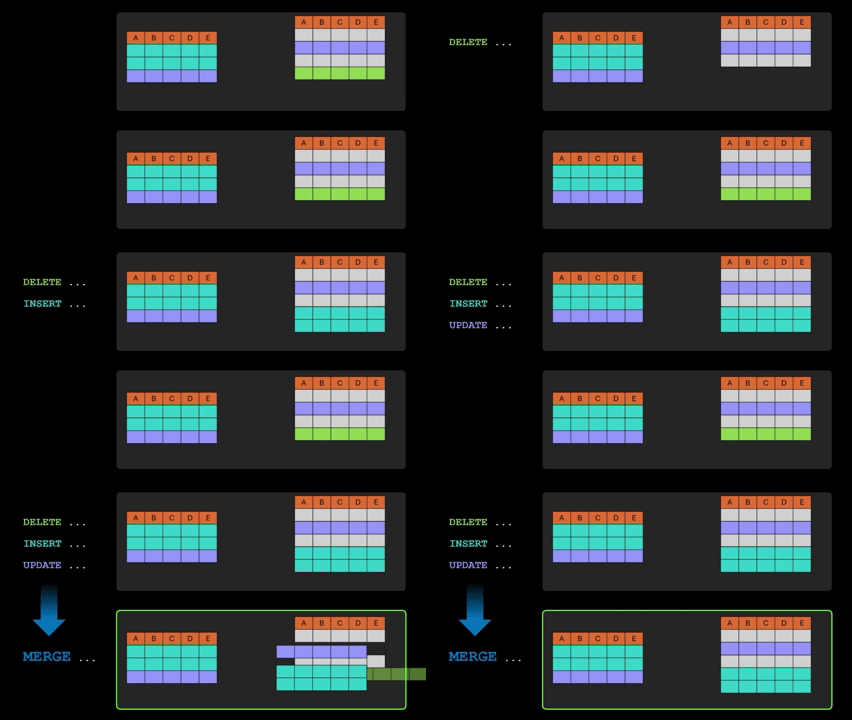
Ahhh, the good old MERGE statement! It’s now generally available in Fabric Data Warehouse. It lets you handle inserts, updates, and deletes in one SQL statement, which makes it easier to sync tables and simplify data transformation logic. Source: Fabric January 2026 Feature Summary | Microsoft Fabric Blog | Microsoft Fabric
Tags:Data Warehousing, SQL Database
SQL Pool Insights gives teams better visibility into overall SQL pool health in Fabric Data Warehouse, not just individual queries. It helps monitor resource pressure, track changes over time, and better understand how pool-level performance affects query execution. Source:Fabric February 2026 Feature Summary | Microsoft Fabric Blog | Microsoft Fabric
Tags:Data Warehousing, Administration, Governance and Security
Embedding Enterprise Governance & Security by Design
Fabric is evolving toward a unified governance model where security, compliance, and risk monitoring are embedded at the platform level rather than implemented per workload. By centralizing access control in OneLake and extending enforcement across engines, APIs, and data types, Fabric enables a more consistent and scalable security architecture. Additional capabilities around encryption, identity management, and Purview integration introduce stronger controls and observability, including for emerging AI-driven scenarios. These changes position governance as a foundational layer within Fabric’s architecture, supporting enterprise-grade security and compliance requirements.
Fabric now lets you get, create, and delete individual OneLake security roles through the REST API. This makes security automation easier because you can change one role at a time instead of resubmitting all roles together.
Tags: Administration, Governance and Security, OneLake, Fabric Ecosystem
With OneLake security for all mirrored item types you can apply table-, row-, and column-level access rules directly to mirrored data in OneLake, making it easier to share the data securely across teams and downstream analytics tools. Source: Fabric January 2026 Feature Summary | Microsoft Fabric Blog | Microsoft Fabric Tags: Administration, Governance and Security, OneLake
OneLake security now supports authorized third-party engines, so security rules like permissions, row-level security, and column-level security can be defined once in OneLake and enforced consistently by supported external engines at query time. This helps organizations keep one central security model while giving users more flexibility in how they query OneLake data. Source:Fabric March 2026 Feature Summary | Microsoft Fabric Blog | Microsoft Fabric
Tags: Administration, Governance and Security, OneLake, Fabric Ecosystem
DLP restrict access now supports more Fabric item types, including Warehouses, KQL databases, and SQL databases, in addition to Lakehouses and semantic models. This helps organizations protect sensitive data more consistently by automatically limiting access when that data is detected.
Tags: Administration, Governance and Security, OneLake
This means notebook content and metadata, including cell code, outputs, and attachments, can be encrypted at rest using keys your organization controls in Azure Key Vault, helping meet stricter security and compliance requirements.
Purview can now help monitor and govern interactions with Fabric Copilots and data agents, so organizations can use AI with more security and compliance control. Microsoft’s current documentation also notes that support for some Fabric Copilot experiences and Fabric Data Agent is still in preview. Source:Fabric March 2026 Feature Summary | Microsoft Fabric Blog | Microsoft Fabric
Tags: Administration, Governance and Security, Artificial Intelligence, Fabric Ecosystem
Enabling AI-Driven Data Interaction & Automation
Fabric is evolving toward an AI-augmented data platform where interaction, orchestration, and execution can be driven through intelligent agents. Enhancements across semantic models, query generation, and agent-based workflows enable more intuitive access to data while reducing manual effort. By integrating AI with platform-level execution capabilities such as CLI and MCP, Fabric enables automated, multi-step operations that span data sources and workloads. This positions AI as both an interface and an execution layer within the platform, supporting more autonomous and scalable data operations.
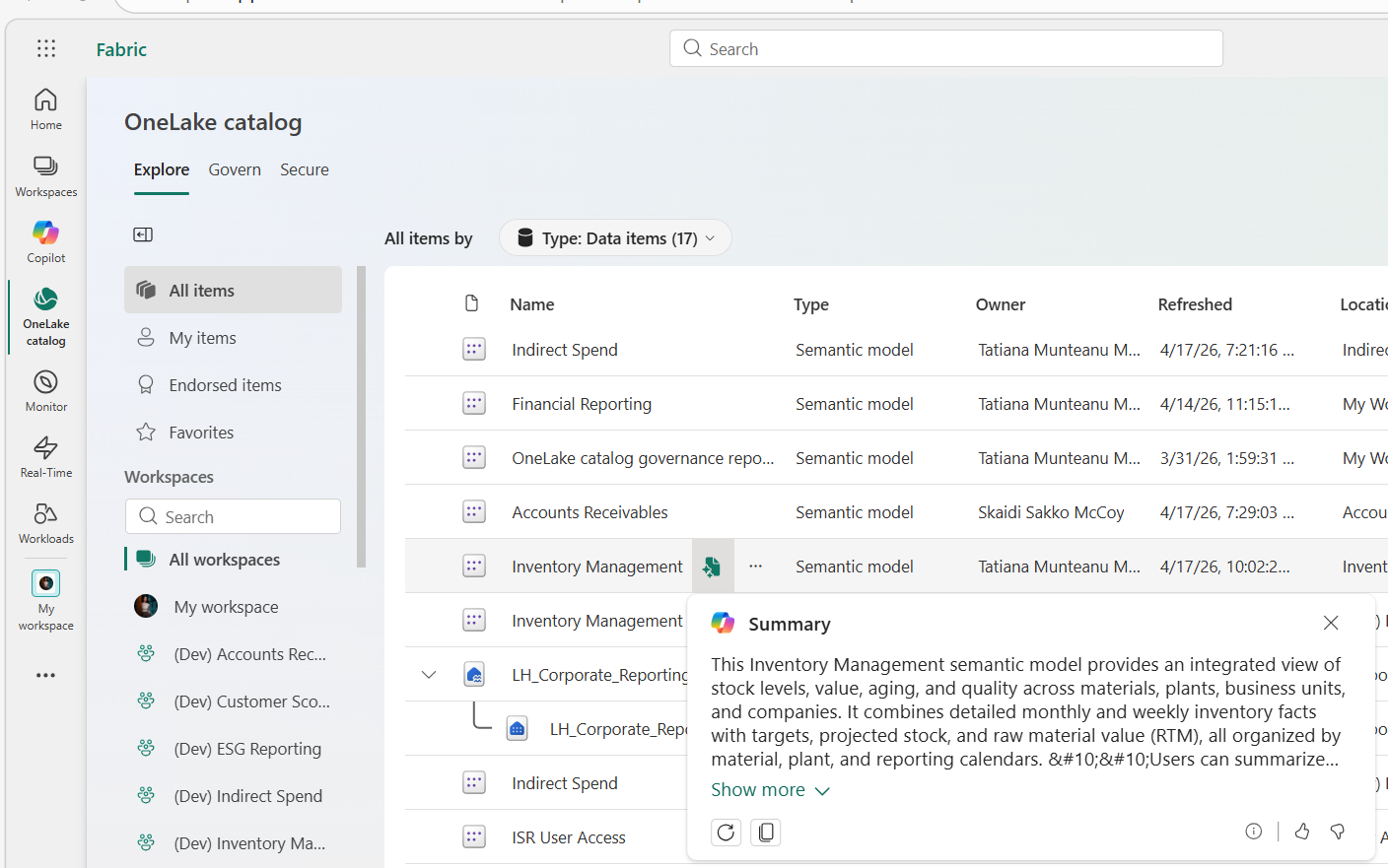
If your Fabric Admin enabled the "Users can use Copilot and other features powered by Azure OpenAI" setting in the Admin Portal, you can use this feature to AI-generate an overview of your semantic model’s, it's purpose and key features without opening it or reviewing all its metadata. It is based on the model’s metadata and structure, and users can generate, refresh, copy, or rate the summary from the Explore tab or the model details page. Source: Fabric January 2026 Feature Summary | Microsoft Fabric Blog | Microsoft Fabric
Tags: Artificial Intelligence, Power BI
Copilot can now generate KQL for Eventhouse shortcuts, just like it does for native tables. This makes it easier for users to explore and query shortcut data.
Data agents are now production-ready Fabric assets that you can configure, share, troubleshoot, and move through DEV, TEST, and PROD more easily. They can be tailored with agent-level instructions, source-specific instructions, and example queries so their behavior fits your business scenario better. Source: Fabric March 2026 Feature Summary | Microsoft Fabric Blog | Microsoft Fabric
Tags: Artificial Intelligence, Fabric Ecosystem, Data Science
Fabric CLI can now act as an execution layer for AI agents, so tools like GitHub Copilot or Claude can turn natural-language requests into Fabric CLI commands instead of calling raw REST APIs directly. This makes AI-driven Fabric automation more practical and reliable, especially with agent instructions, better error messages, and persistent REPL sessions for multi-step workflows.
Fabric Remote MCP Server is a cloud-hosted service that lets AI agents perform real actions directly in your Fabric environment, without needing a local installation. Agents authenticate with Microsoft Entra ID, work within existing RBAC permissions, and their tool usage is recorded in audit logs, which helps support secure and governed automation. In practice, this means AI tools such as GitHub Copilot, Cursor, or Claude Desktop can use Fabric MCP to manage workspaces, work with item definitions, handle permissions, and perform other supported Fabric operations through a standard MCP interface. The feature is currently in preview.
Tags: Artificial Intelligence, Fabric Ecosystem, Administration, Governance and Security
Expanding Real-Time & Event-Driven Analytics
Fabric is evolving its real-time processing layer to support more flexible ingestion, improved performance, and simplified interaction with streaming data. Enhancements in Eventstream broaden connectivity options and enable secure ingestion from private environments, while Eventhouse improvements introduce more granular control over data acceleration and freshness. In parallel, optimizations in query execution and dashboard rendering reduce end-to-end latency from ingestion to insight. These changes position Fabric’s real-time capabilities as a more integrated and production-ready component of the overall data platform architecture.
Eventstream now supports MQTT v3.1 and v3.1.1, making it easier to connect common IoT brokers and stream data into Fabric. This helps organizations use their existing MQTT setup for real-time analytics and alerting.
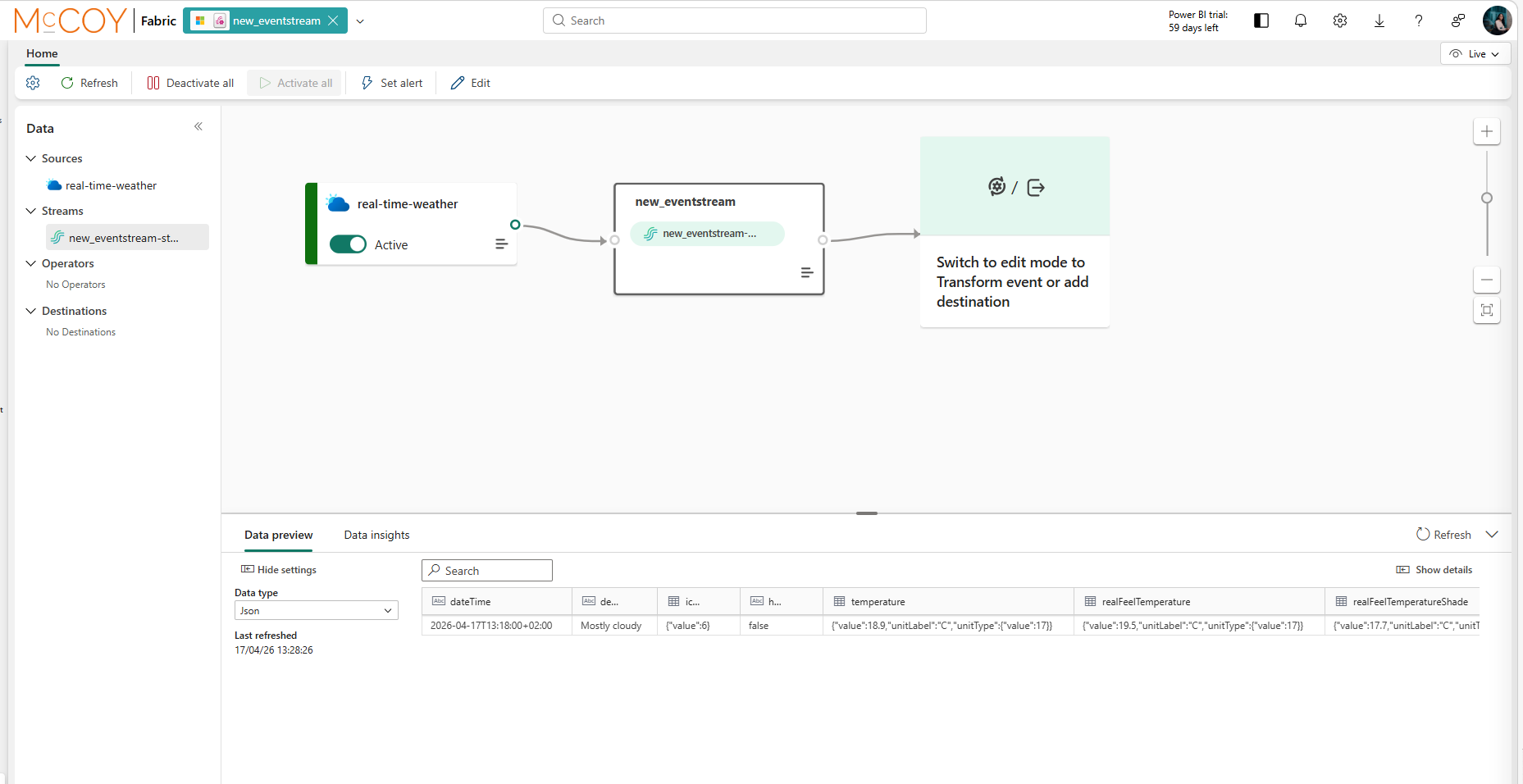
The Weather Connector is now generally available and ready for production use. The real-time weather connector allows you to ingest live weather data from a selected location into Eventstream. It provides real-time weather conditions such as precipitation, temperature, and wind for a specified set of coordinates. This data is updated every minute to ensure timely insights.
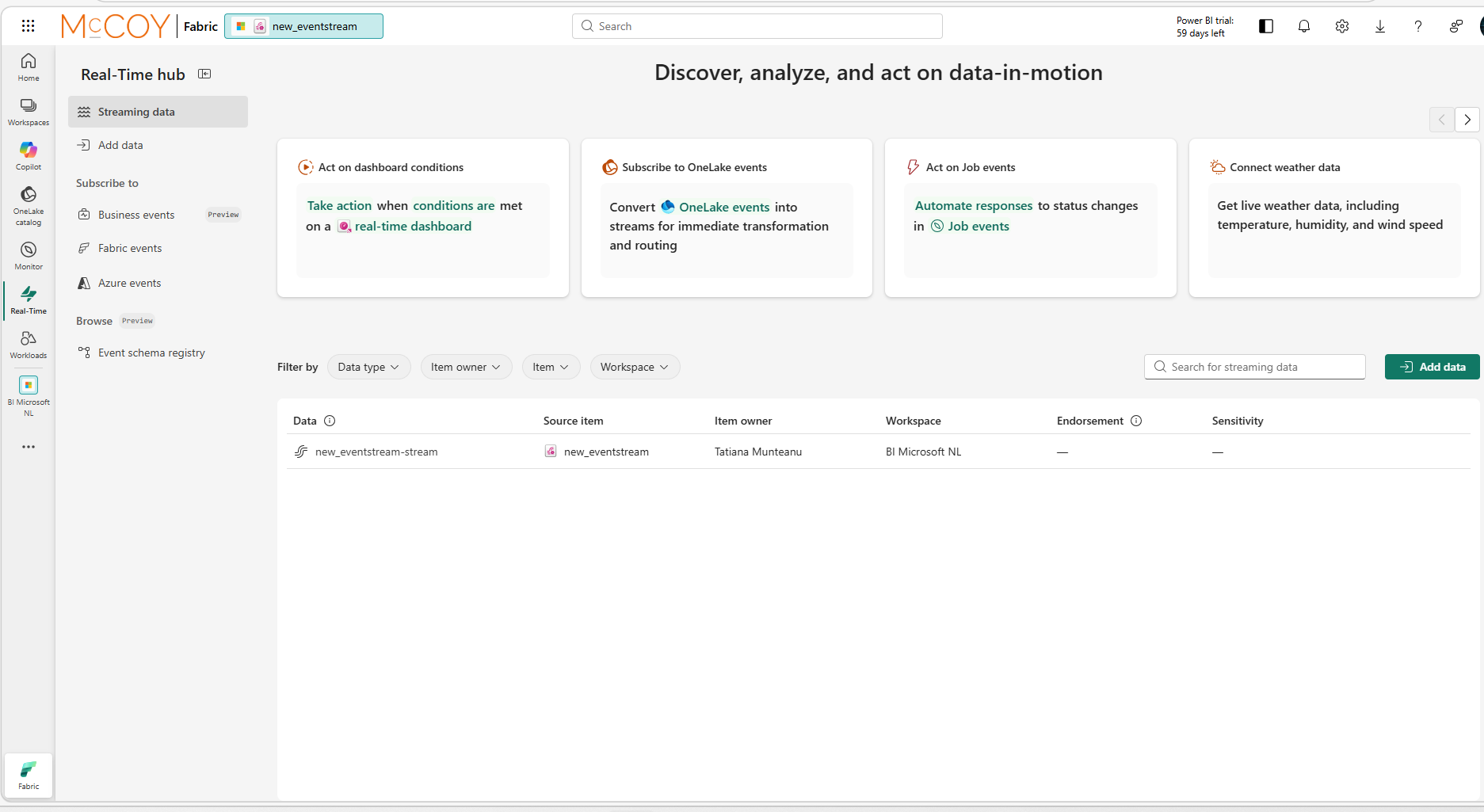
Real-Time hub now uses a single Add data entry point instead of separate options like Data sources and Azure sources. This makes it easier for users to start connecting data without having to think about connector categories.
Users can now override the default freshness setting at query time, making it easier to balance performance and data freshness. This gives more flexibility without changing the underlying policy.
Fabric is evolving into a more interoperable and enterprise-ready integration layer by expanding connectivity across platforms, tools, and network boundaries. Support for standard interfaces such as ODBC enables external systems to interact with Fabric workloads more easily, while multi-cloud data movement capabilities improve flexibility in hybrid architectures. In parallel, enhancements in API security through Private Link introduce stronger controls for accessing Fabric services within restricted network environments. These changes reinforce Fabric’s role as a central integration hub within modern data architectures.
Which lets tools and applications like Python, .NET, and other ODBC-compatible clients connect to Spark SQL in Fabric. It is designed for enterprise use and includes features like Microsoft Entra ID authentication, session reuse, and ODBC 3.x compliance.
Copy job now supports SAP Datasphere Outbound through Amazon S3 and Google Cloud Storage, in addition to ADLS Gen2. This gives teams more flexibility to use multi-cloud staging options for CDC replication from SAP to supported destinations.
Tags:Data Factory, Data Engineering, Fabric Ecosystem
Honorable Mentions
The Native Execution Engine now supports both Z-Order and Liquid Clustering, so Fabric can combine faster query execution with smarter data layout on Delta tables. This helps queries scan fewer files and fewer bytes, improving performance and lowering cost for large analytical workloads. A simple way to say it is: Fabric can now benefit from both storage-level optimization and execution-level acceleration at the same time, without requiring changes to your Spark code. Once the Native Execution Engine is enabled, you can use standard Delta Lake commands like OPTIMIZE ... ZORDER BY or Liquid Clustering on supported tables. Source:Fabric March 2026 Feature Summary | Microsoft Fabric Blog | Microsoft Fabric
Tags:Data Engineering, Data Warehousing
Fabric can now pack many more notebooks into one shared Spark session when needed, which is useful for large pipeline or peak-load scenarios. The default remains 5, and Microsoft notes you can raise it anywhere from 2 to 50 depending on your workload needs By increasing the session sharing limit, teams can run more notebooks on the same high-concurrency session instead of spreading them across many separate sessions. This can improve startup times during busy periods, increase session efficiency, and give customers more flexibility to tune concurrency based on actual workload demand. Source:Fabric March 2026 Feature Summary | Microsoft Fabric Blog | Microsoft Fabric Tags: Data Engineering
Are you a Friend of McCoy?
As an innovation partner, we want to continue inspiring you. That's why we gladly share our most relevant content, events, webinars, and other valuable updates with you.